Was this page helpful?
Visa Secure multi-factor authentication (MFA) on BNZ business credit cards
Other customer communications{"type":"text","heading":"Visa Secure multi-factor authentication (MFA) on BNZ business credit cards","bodyText":null,"actionLinkHref":null,"actionLinkLabel":null,"supportingLinkHref":"\/about-us\/governance\/public-notices\/customer-communications-support","supportingLinkLabel":"Other customer communications","theme":"boxed","heroImage":null,"heroImage2x":null,"smallHeroImage":null,"smallHeroImage2x":null}
Frequently asked questions (FAQs) and information guide for your employees
These FAQs have been written to provide you with information to specific questions you may have regarding how this change works for your employees.
We also have an information guide (PDF 496KB) you can share with your employees, with explanations of what Visa Secure is, how they will use MFA to confirm transactions, and the steps they need to take to get set up.
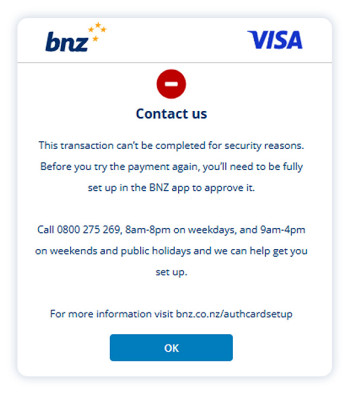
This information is for BNZ business credit cardholders who are unable to authenticate an online transaction as shown in the screenshot below:
Topics
Getting set up
Why would employees with business credit cards need to authenticate an online transaction?
If a transaction is flagged by Visa Secure as potentially fraudulent, we will request confirmation of the transaction from the cardholder.
To prevent fraud from occurring, an MFA request is sent to the cardholder via the BNZ app, asking them to confirm they’re making the payment.
To approve this request and complete the payment, your employee may need to complete the following:
- Register for Internet Banking.
- Download the BNZ app.
- Call us to load their business credit card into the BNZ app.
To register and load their business credit card in the BNZ app, they’ll need to call us on 0800 275 269 or visit their nearest branch, so we can guide them through the process.
How do my employees download the BNZ app?
They can download the BNZ app from the App store (iPhone and iPad) or Google Play Store (Android phone).


Why do my employees with business credit cards need the BNZ app?
Our MFA tool is built into the BNZ app.
This means when a Visa Secure confirmation request is triggered they can confirm they’re making the online transaction (or decline a fraudulent attempt). This helps protect your business against fraud.
My employee doesn’t have any accounts with BNZ — what do they need to do?
They don’t need to have any accounts with BNZ to link their business credit card to the BNZ app. To complete the MFA confirmation, they will need the BNZ app with their business card loaded.
To add their business credit card to the app, your employee should contact us on 0800 275 269 or visit their nearest branch. This has to be done by the cardholder directly.
My employee called the call centre and were asked for an access number. What is an access number?
An access number is provided when a BNZ customer has registered for Internet Banking.
If your employee doesn’t have an access number, or can’t remember it, please advise them to stay on the line and wait to speak to a banker who can help them set up their card in the BNZ app.
How do my employees contact BNZ if they’re overseas?
Any employees based or travelling outside of New Zealand can be assisted over the phone by contacting us on +64 931 8209 (international toll charges may apply) from 8am to 8pm NZT on weekdays, and 9am to 4pm NZT on weekends or New Zealand public holidays.
Your employee can download and use the BNZ app while overseas.
What are the additional benefits of employees having their business credit card in the BNZ app?
There are a lot of benefits to having your employee’s business credit card registered in the BNZ app.
Cardholders will have greater control and visibility of their card, such as:
- Activate new or re-issued cards from anywhere.
- Manage their PIN in the BNZ app.
- Notify us when they’re travelling, avoiding the possibility of having their card temporarily blocked.
- View their transactions and available balance on the card.
- Manage (turn on or off) card controls, like international transactions, PayWave, online transactions, and ATM transactions (if the card is set up for ATM use).
- Block a lost card, unblock it if it shows up.
- Replace a lost or damaged card.
They’ll also get access to any new functionality we add in the future.
They will not be able to create new cards, increase limits or close their credit card. That functionality sits with the business owner.
My employee has another BNZ app (FlexiPurchase/BNZ Mobile Banking for Business), why do they need the BNZ app?
Visa Secure fraud notifications are only sent through the BNZ app. This means your employee will need the BNZ app to confirm the transaction.
Now that my employee's set up
Now that my employee is set up, how do they confirm online purchases are being made by them?
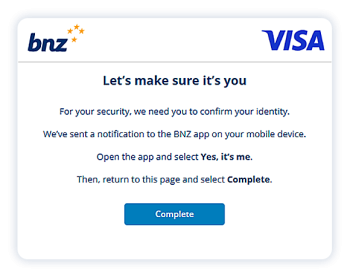
For selected online transactions, they may see a window like this pop up towards the end of the purchase:
They’ll then get a BNZ app notification on their device. By tapping on the notification, the BNZ app will open, and they’ll be asked to confirm whether they’re making the transaction:
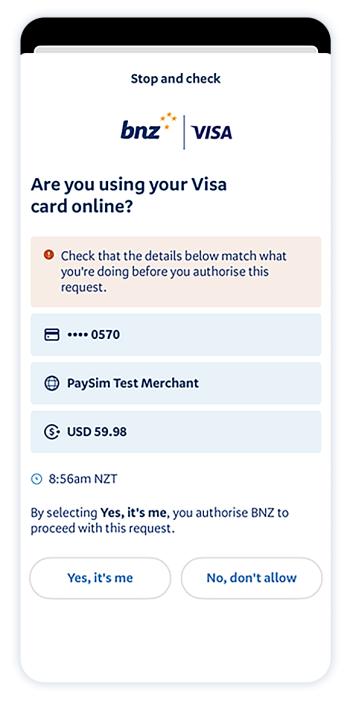
It’s important they only confirm transactions they’re making – if they receive an authentication request but haven’t made a transaction, it’s possible someone is trying to make a fraudulent transaction.