Listed in: Securing your business
Protect your business from phishing and ransomware
Kiwi businesses are targeted by cyber scammers every day. Phishing emails, as well as ransomware, can steal tens of thousands of dollars with little effort. Here’s how to stay safe.
5 minute read

Phishing
We’ve all received emails that look like they’re authentic, pretending to be from a bank or other financial institution requesting that we update our personal information. The link takes us to a website made to look exactly like the bank’s website – convincing enough that we may have logged onto the site with our username and password.
This is exactly what cyber criminals want us to do, and our information can then be used to log into the real bank site and access our accounts. This type of computer crime is a huge problem and many attacks are designed to gain access to financial accounts – including business accounts.
Ransomware
Ransomware presents a threat that can severely disrupt your business and bring significant unplanned costs. It’s a computer virus that encrypts all your data files making them inaccessible, and the criminals then demand payment for them to be unencrypted to use again. It’s very important you take steps to avoid becoming a ransomware victim. It’s equally important to have the ability to recover quickly if an attack occurs.
REMEMBER
If you see a message like this one, you’re in for a really bad day:
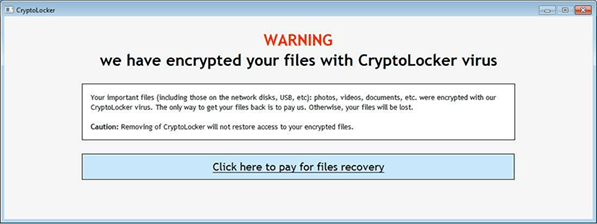
A ransomware attack can be both costly and disruptive. A hospital in California made national news by paying the equivalent of NZD 25,000 to data kidnappers. Recovery and eradication can take days, seriously disrupting your business. If you’re not prepared, you might even lose precious data permanently.
How ransomware works
Ransomware not only affects the data files on your computer’s hard drive, but also encrypts all the shared data files that your computer can access. So, one infected computer can affect your entire office. Once all your data is inaccessible, the cyber criminals demand payment to restore your files back to their original condition. Usually there’s a time limit, after which your files cannot be recovered. The ransom can vary from several hundred to thousands of dollars.
Payment is made to an anonymous site via Bitcoin. It’s all set up so you have no idea who you’re paying, and the payment is completely untraceable. Once payment is made, the criminals provide you with a digital key that unlocks your data files. Since you don’t know who you’re dealing with, there’s no recourse if a key is not provided. Also, there’s no guarantee that it won’t happen all over again.
Banking Malware
Banking malware is a type of malicious software built by cyber criminals with the intention to specifically target accessing online bank accounts.
Once malware is installed on a computer, when a victim goes to log in to their bank accounts, they will often be redirected to a hoax page to enter their credentials.
They’ll then see a fake outage or wait message that tells them their bank account can’t be accessed due to maintenance or a service outage.
Meanwhile, the banking malware has collected the victim’s information and sent it to the criminals, who can now log in and access that victim’s bank accounts. The criminals continue to display fake outage or wait messages so that they can steal funds and manipulate accounts.
How ransomware and banking malware infect your computer
The most likely source of infection from ransomware or banking malware, is through emails. These emails look legitimate. They may look at first glance to be from companies or individuals you know and entice you to click on a link or attachment. Once you do, it then prompts you to run a programme that installs the malware on your computer. Sometimes this can occur invisibly to the user.
While the ransomware demand for payment will appear shortly after infection, banking malware will lie in wait until you visit the internet banking log in page.
Recovery from ransomware and banking malware
If you get infected with malware or ransomware, it’s important not to pay the ransom. It can make you an ongoing target for cyber criminals, and there’s no guarantee they’ll release your files back to you.
Make sure your critical business data is backed up, using multiple layers – both on site as well as off site or in the cloud. This means that no matter what happens, you can recover your important data as quickly as possible with minimal disruption.
If you notice wait or maintenance messages while logging into, or during your internet banking session, please contact your bank immediately.
For further information on cyber incidents and technical advice on how to respond to them visit https://www.cert.govt.nz
Simple ways to step up your security and protect yourself online
The threat of phishing emails and ransomware is very real, but there are a number of things you can do to protect yourself:
- Passwords should be strong and unique. Avoid using the same password for multiple logins as it opens the opportunity for all your key information to be compromised. Using a password manager that encrypts and securely stores your passwords can help you remember them all.
- Regularly backing up key data is another necessity, especially as small business owners increasingly turn to the cloud to store their information.
- It’s crucial to keep your operating systems and applications updated, as this protects you from new vulnerabilities that have been discovered.
- Any remote access to your systems should be gained via secure networks. As tempting as it may be to use free public WiFi, it opens the opportunity for others to see what you’re doing online. Using a virtual private network or VPN, is a more secure option.
- Treat every hyperlink in an email with suspicion. This includes emails from trusted sources, because it’s not unusual for an email account to be broken into and used to send malicious emails to the user’s friends and colleagues.
- If you hover the cursor over a suspicious link you should see the actual web address for the link. If this address is not what you expect then don’t click on the link.
- If an ‘official’ message from a large company is not personalised and contains poor spelling and grammar, then that’s a tell-tale sign it’s not legitimate. Report the email to the company through verified contact channels, such as phone or forwarding by email.
- If a hyperlink takes you to a page requesting any sort of personal information, then check the address in the web browser’s window to verify that you’re at the right site. For instance, if you think you’re at paypal.com, but the web page address says paypa1.com, close the browser window immediately.
- The web address for any site requesting private information should start with ‘https’. This means that you have a secure connection to the web server. If it doesn’t, don’t trust it.
- Use two factor authentication whenever it’s available for your online accounts, such as your email and internet banking and all other online services that contain critical business or personal information.
A threatening email is a problem only if you click on the malicious link it contains. Staff should be regularly reminded not to click on links or attachments in emails sent from unknown sources or that they aren’t expecting, and encouraged to trust their instincts if they sense something doesn’t look quite right. Your care and diligence may well avoid a major problem for you and your company.
Related articles
How the cloud can help your small business
Today’s business climate is constantly changing and, as a small business owner, keeping up is crucial to your success. Using cloud base computing solutions can help.
Starting an ecommerce channel for your business
Online sales continue to grow. An online shop can offer an additional sales outlet and even help you scale internationally. Get started with these tips.
How tech can create business opportunities
Trying to expand your small business? Embracing technology is just one of the ways to make yourself more flexible and therefore more available to clients.
Related tools
Online Security

Business Cyber Security Toolkit (PDF 1.3MB)

Step up your online security
Protect your business